You’d expect converting an arbitrary string to DATETIME to fail with a conversion error. But why does it work with INT values? Or rather, why does it only work for a certain range of values?
Table of contents
Open Table of contents
The DATETIME range
According to Microsoft’s documentation for the DATETIME data type, this is its range of values:

In other words, a DATETIME column can only store dates between January 1, 1753 and December 31, 9999. Any attempt to set a value outside that range results in an error.
The default value
The documentation also tells us that the default value for DATETIME is January 1, 1900:

This does not mean that a DATETIME variable declared without a value automatically gets this date. It will be NULL.
The default value is used when an operation doesn’t specify a date, for example in explicit or implicit conversions.
Converting INT to DATETIME
The information above helps us understand how DATETIME works, but how does it answer the original question?
If we declare an INT variable with the value 0 and convert it to DATETIME, we get this:
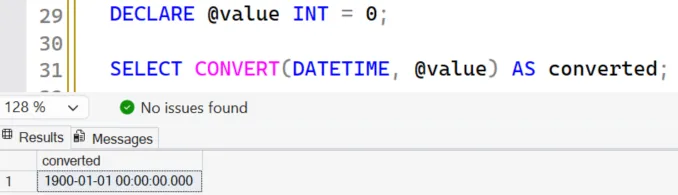
SQL Server automatically converted 0 to the default value mentioned above.
Now with the value 1, SQL Server returns January 2, 1900:
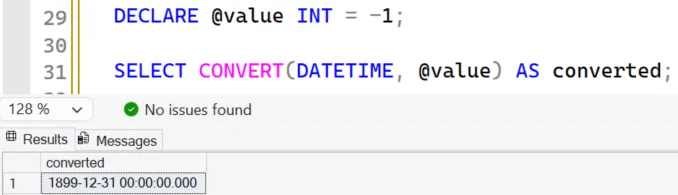
What’s happening is that when you convert an integer to DATETIME, SQL Server adds that number as days to the default value 1900-01-01:
- With
0, it added 0 days to the default value. - With
1, it added 1 day and returned 1900-01-02.
The same thing happens with negative integers, except now the days are subtracted. Setting -1 returns 1899-12-31:

The range of valid integers
So integers are added as days to the default value. Does that work for any integer?
As we saw earlier, DATETIME only accepts values between 1753-01-01 and 9999-12-31. So the only integers that can be converted are the ones whose number of days, added to or subtracted from the default value, still lands inside that range.
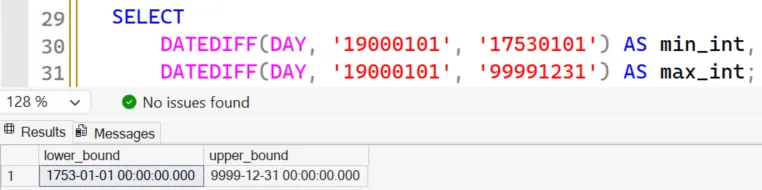
Knowing that, we can calculate the number of days between 1753-01-01 and the default value, and between the default value and 9999-12-31:
SELECT
    DATEDIFF(DAY, '19000101', '17530101') AS min_int,
    DATEDIFF(DAY, '19000101', '99991231') AS max_int;
The smallest possible value is -53690 and the largest is 2958463:
Converting those results back to DATETIME returns, as expected, exactly the boundaries of the type:
SELECT
    CONVERT(DATETIME, -53690)  AS lower_bound,
    CONVERT(DATETIME, 2958463) AS upper_bound;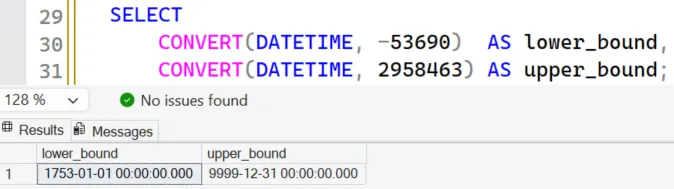
| Integer | Resulting DATETIME |
|---|---|
-53690 | 1753-01-01 00:00:00.000 |
-1 | 1899-12-31 00:00:00.000 |
0 | 1900-01-01 00:00:00.000 |
1 | 1900-01-02 00:00:00.000 |
2958463 | 9999-12-31 00:00:00.000 |
Integers out of range
Only values between -53690 and 2958463 can be converted to DATETIME, because they represent the limits of the data type.
This is the error you get when you try to convert an integer outside that range:
SELECT CONVERT(DATETIME, 2958464);Msg 8115, Level 16, State 2
Arithmetic overflow error converting expression to data type datetime.
In theory, 2958464 would represent January 1 of the year 10000. But since it goes past the upper limit of DATETIME, the conversion fails with an overflow error. The same happens with -53691 or any other integer outside the range.
Conclusion
The initial questions look simple, but they help us understand how DATETIME works and how integers are converted to dates.
The idea for this post came from a real case: I had to figure out why a conversion error suddenly started happening “out of nowhere” in a production environment.
Knowing how the data types work was one of the things that let me act quickly and pinpoint the problem. This kind of fundamental understanding can be crucial when solving complex issues in critical environments.